




Forensic Timeliner è un motore di elaborazione forense ad alte prestazioni pensato per supportare gli analisti DFIR (Digital Forensics and Incident Response) nelle attività di triage e correlazione degli artefatti. Lo strumento consente di aggregare rapidamente file CSV provenienti dai principali tool forensi, trasformandoli in una sequenza temporale unica, filtrabile e pronta per l’analisi investigativa.
Con il rilascio della versione 2.2, mantenuta in C# su piattaforma .NET 9, il progetto introduce un insieme di miglioramenti mirati soprattutto all’esperienza d’uso della modalità interattiva. Il menu CLI è stato esteso con nuovi prompt che permettono di visualizzare in anteprima le configurazioni di filtro applicate agli artefatti più rilevanti, come MFT e registri eventi di Windows.
I nuovi prompt consentono, ad esempio, di ispezionare in modo strutturato i filtri sui timestamp, sui percorsi e sulle estensioni dei file MFT, oltre ai criteri basati su canali e provider per i log di evento.
Le configurazioni di tagging delle parole chiave, definite nei file keywords.yaml, vengono ora mostrate automaticamente quando si utilizzano EZ Tools in presenza dei file di configurazione.
Le anteprime sono renderizzate in tabelle avanzate tramite Spectre.Console.
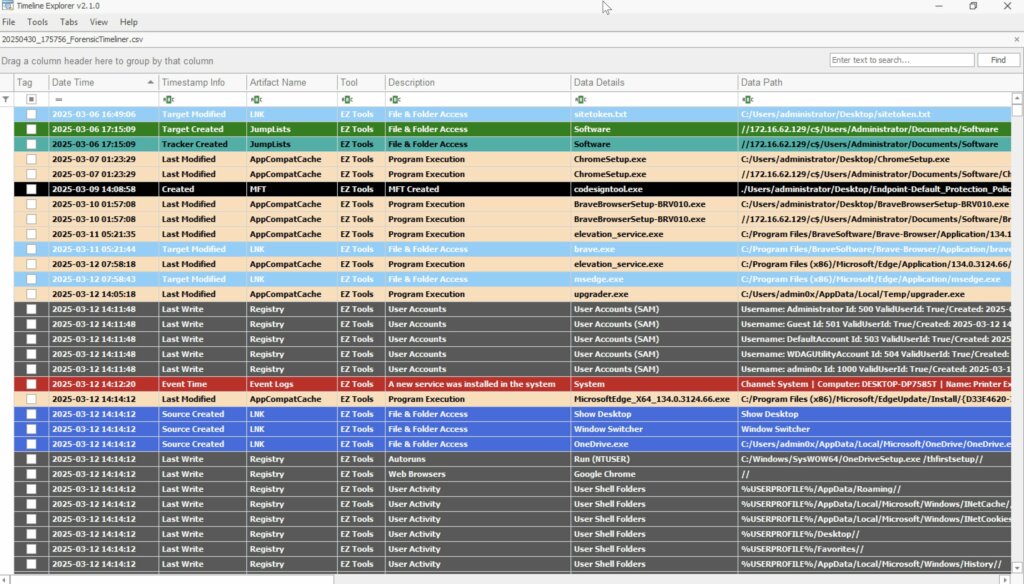
Un’altra novità significativa riguarda l’integrazione con Timeline Explorer. Forensic Timeliner introduce un’opzione interattiva dedicata all’abilitazione del keyword tagging, che consente di generare automaticamente un file di sessione .tle_sessfile. Le righe della timeline vengono etichettate sulla base di gruppi di parole chiave definiti dall’utente, con la possibilità di visualizzare un’anteprima dei gruppi prima dell’attivazione.
Dal punto di vista funzionale, il tool continua a supportare l’unificazione degli output CSV prodotti da EZ Tools/Kape, Axiom, Chainsaw, Hayabusa e Nirsoft. La scoperta dei file avviene in modo automatico a partire da una directory di base, utilizzando criteri configurabili tramite YAML che includono nomi dei file, nomi delle cartelle e intestazioni CSV. Per strumenti come Hayabusa, che permettono output personalizzati, è richiesto l’uso di una convenzione di naming coerente.
La timeline generata può essere arricchita con metadati e tag basati su parole chiave, facilitando l’analisi all’interno di Timeline Explorer. L’esportazione avviene in formato CSV conforme allo standard RFC-4180, garantendo la compatibilità con strumenti forensi e ambienti di analisi come Excel. Sono inoltre disponibili filtri temporali, funzioni di deduplicazione e opzioni sperimentali per includere i dati grezzi delle righe sorgente.
L’esecuzione del programma può avvenire sia tramite riga di comando sia attraverso una modalità interattiva che guida l’utente nella costruzione dei comandi. Tra le opzioni disponibili figurano l’elaborazione selettiva dei singoli strumenti, l’analisi completa automatica, l’attivazione del tagging e la definizione di finestre temporali. Le configurazioni YAML permettono un controllo granulare sulla scoperta degli artefatti, sui filtri dei registri eventi e sulla normalizzazione dei timestamp MFT.
Forensic Timeliner supporta un ampio ventaglio di artefatti, che spaziano dai registri eventi Windows ai dati di navigazione web, dai file di esecuzione automatica ai log di sicurezza e agli indicatori di minaccia.
Ogni strumento integrato dispone di una documentazione dedicata che descrive la mappatura dei campi, i comportamenti di parsing e i formati di input attesi. Il progetto è distribuito con licenza MIT ed è disponibile nella versione più recente 2.2, accompagnata da dati di esempio per attività di test.
Ti è piaciuto questo articolo? Ne stiamo discutendo nella nostra Community su LinkedIn, Facebook e Instagram. Seguici anche su Google News, per ricevere aggiornamenti quotidiani sulla sicurezza informatica o Scrivici se desideri segnalarci notizie, approfondimenti o contributi da pubblicare.

 Cybercrime
 Innovazione
 Cybercrime
 Vulnerabilità
 Innovazione