




Author: Antonio Piovesan
Publication date: 08/09/2021
With the increase of ransomware infections – often instigated through phishing emails, it’s very important/crucial to take proactive measures to help protect yourself and your organization’s security.
Of course having computers and servers that are up-to-date as far as patches, antivirus and other endpoint facilities makes a big difference in reducing the overall risk of infection, but being prepared on detecting phishing emails and educating employees in your organization to also be proactive is a critical step in protection.
To understand how a “phishing email” threat-actor thinks, you can take a look at Veronica Patron‘s video on RedHotCyber
For an introduction on what phishing is you can read Massimiliano Brolli’s article on RedHotCyber: https://www.redhotcyber.com/post/il-phishing-cosa-%C3%A8
Just to keep thinks simple I will write about 12 not-too-technical golden rules:
Most modern email client or email web providers (like GMail, Microsoft and many others) DO NOT show/display the email sender address but a nickname/an alias. So you could see a name or an email address you know and think it’s safe, while the inner/hidden real address is not safe but malicious.
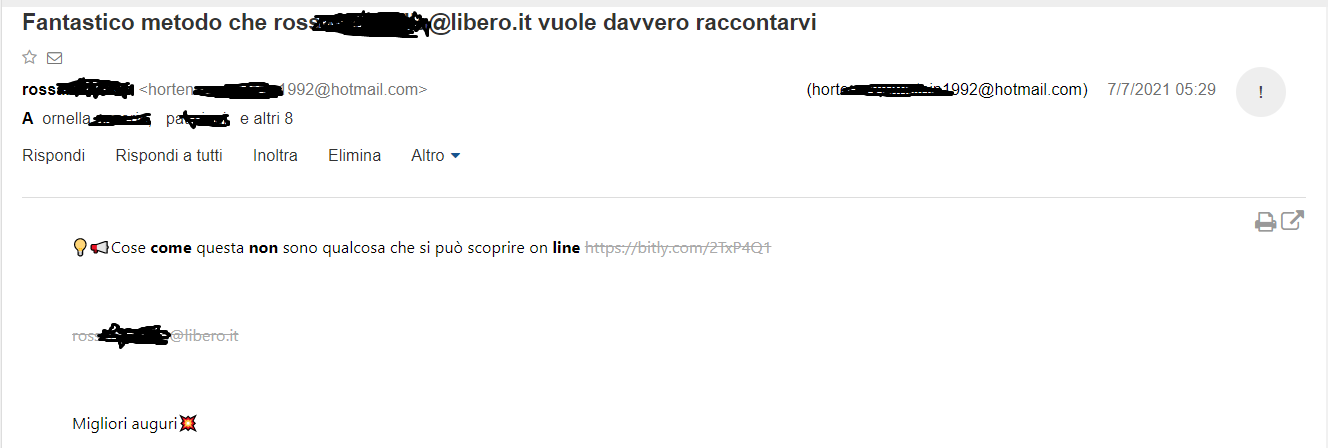
Figure 1
In figure 1 we can see a fake email sent by ros…..…@libero.it, actually sent by real hidden email address horten……[email protected] (the picture shows what nowadays www.libero.it web mail client can show to the end user).
Unfortunately, internet email technologies (standard email, SMTP protocol) are old and based on standards that do not guarantee the truthfulness of the sender.Interested readers can keep on reading at rfc5321https://datatracker.ietf.org/doc/html/rfc5321 paragraph 7.1 Mail Security and Spoofing
SMTP mail is inherently insecure in that it is feasible for even
fairly casual users to negotiate directly with receiving and relaying
SMTP servers and create messages that will trick a naive recipient
into believing that they came from somewhere else.
So the underlying address could be a known / valid address, but used by malicious third parties, since as indicated in RFC 5231 p. 7.1 the protocol does not verify that a “sender” is in fact “who he says he is”.
Hover or mouse over parts of the email without clicking on anything. If text appearing looks strange or doesn’t match what the link description says, Do NOT click and report the event to your IT /Sec department. See figure 2.
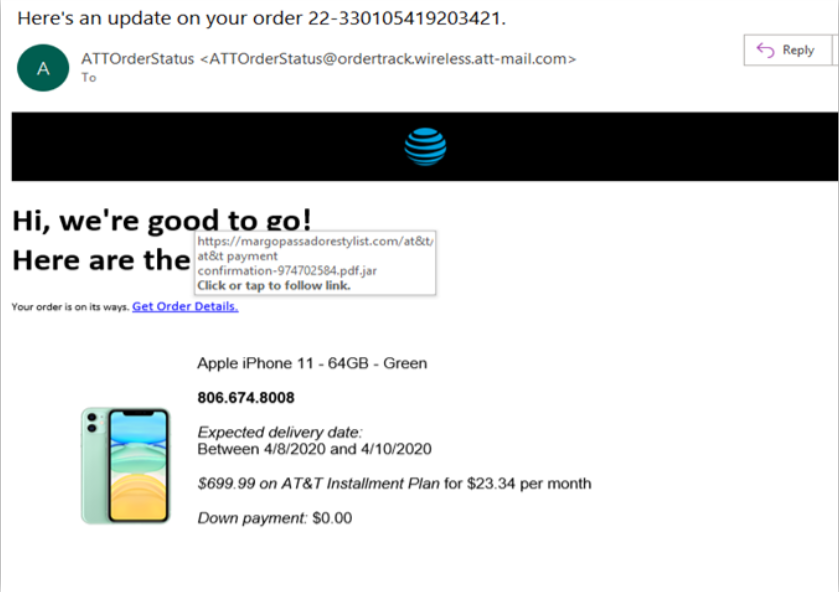
Figure 2
Attackers are often less concerned about spelling or being grammatically correct than a normal legitimate sender would be. Take a look at figure 3.
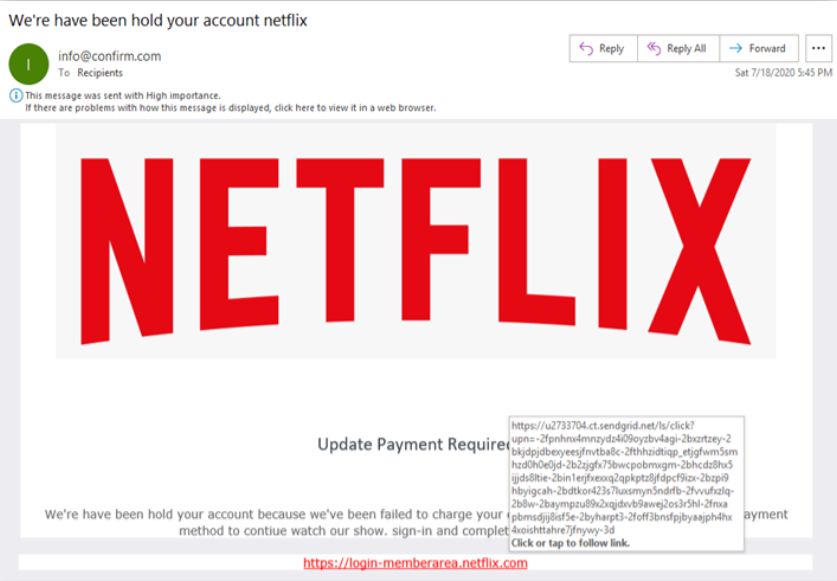
Figure 3
“We’re have been hold your account …” the sentence has no meaning/is grammatically wrong. As in figure 2 also the “hover URL” is a sign of scam…
Hackers often rush to get phishing sites up and prepare scam emails, so some of them will look significantly different from the original company. You can use these traits, such as also slight differences in logos/trade marks, to pick a malicious email out of your inbox.
Is the starting of the email general or vague? Something like “Dear customer” or “Valued customer”?
Usually who knows you will call you by your name. See figure 3a. As in figure 2 and figure 3 also in figure 3a the “hover URL” is a sign of scam…
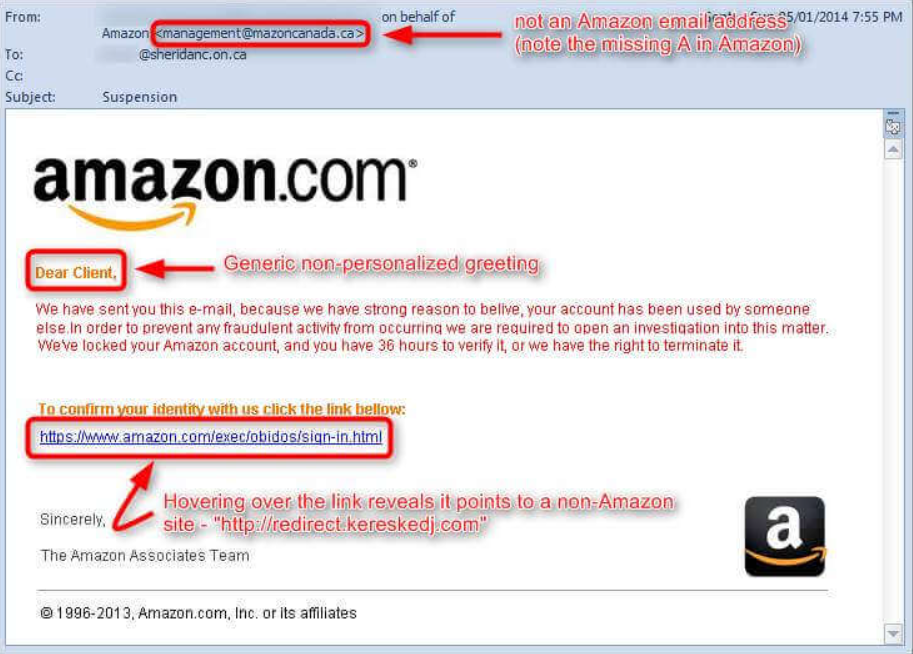
Figure 3a
Legitimate companies you are related to, NEVER ask you or are unlikely to ask you personal information via email or phone call (remember Vishing and Kevin Mitnick books on social engineering). See figure 4.
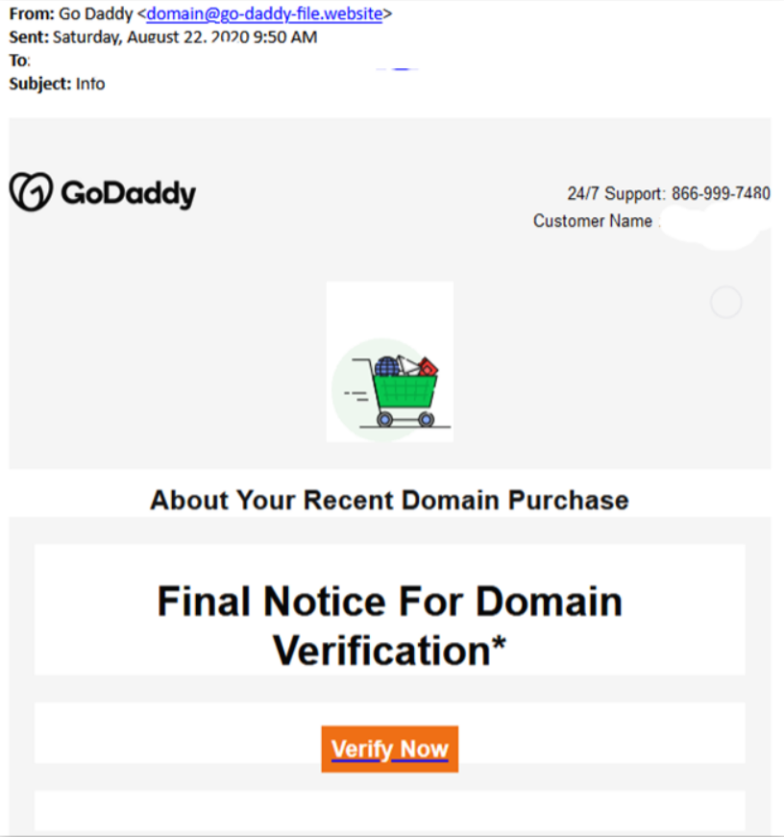
Figure 4
This malicious emails could try to make you think about something really really urgent to be done: sending some money (even few money) to claim a big reward or, like in BEC/whaling attack, pretending to be a manager in your organization stating that your company CFO needs an urgent big money wire transfer.
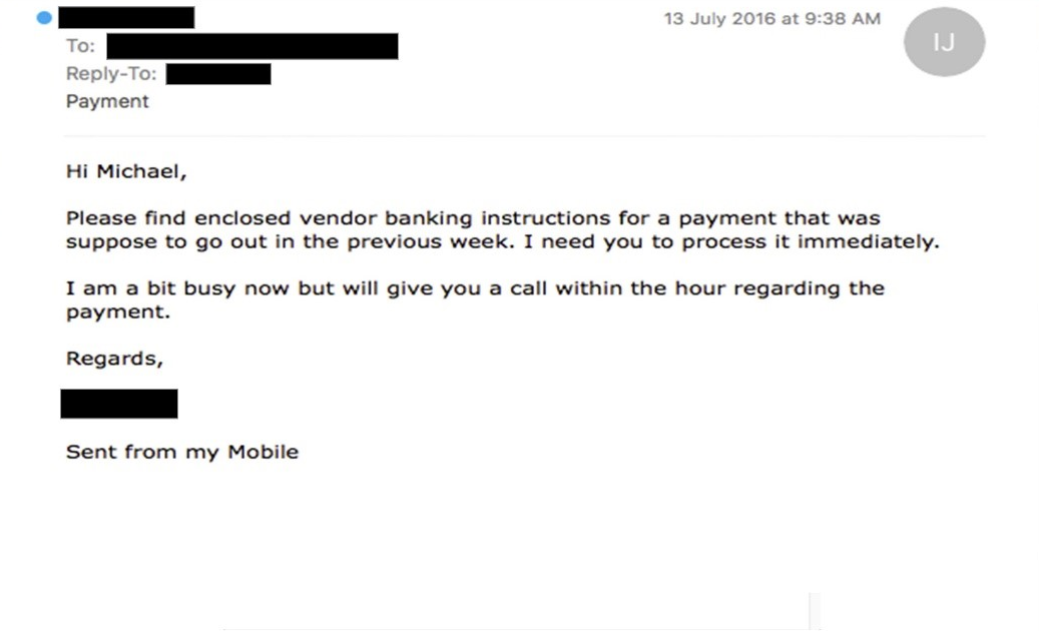
Figure 5
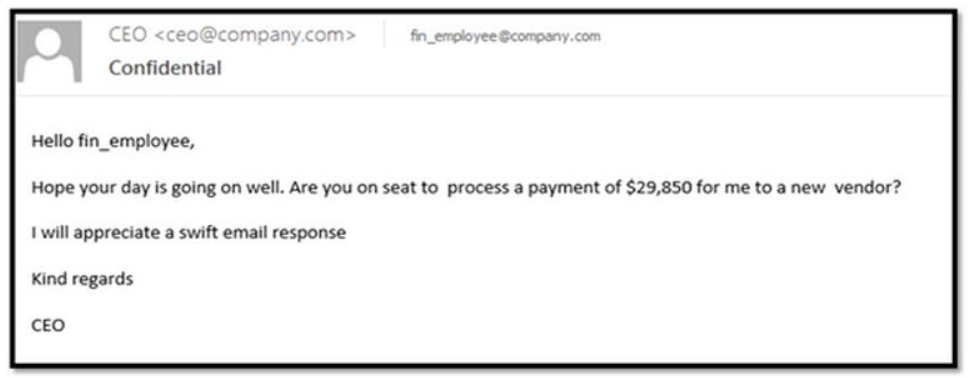
Figure 6
Figure 6
Most legitimate senders will send an email including a full signature block at the bottom of the email. Moreover, info on that block must match text in other email parts. Look at figure 4 and 5, no signature block is present.
Look at figure 7, you will see a mismatch between sender reference and details on the signature block.
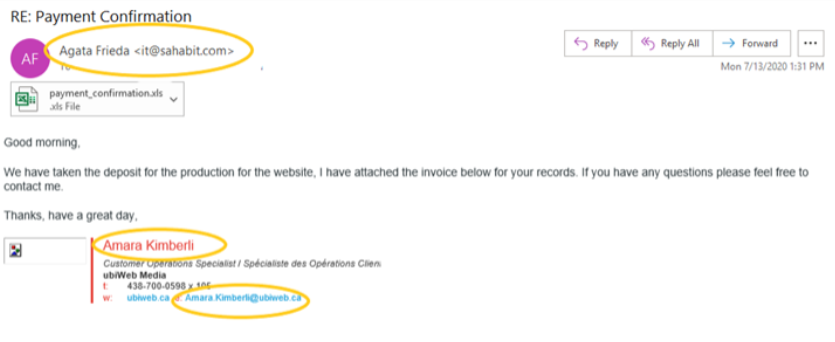
Figure 7
An F-Secure report about the most dangerous email attachment types says that there are 85% chances that the malicious emails will have .DOC, .XLS, .PDF, .ZIP, or .7Z attachment. These are the files that users often open without any hesitation because they’re so commonly used in businesses — hackers know this and use it to their advantage. This could be the entry point for a dropper for starting a ransomware and/or APT attack.
If something doesn’t add up, or seems even slightly out of the norm, call a colleague or third party people that can confirm the email is legitimate or a scam. As a final check always call and report it to your IT security expert.
New phishing scams are being developed all the time. Without staying on top of these new phishing techniques, you could inadvertently fall to one of them. Keep your eyes opened for news about new phishing scams. By finding out about them as early as possible, you will be at much lower risk of being on the hook, snared by one.
For IT administrators, ongoing security awareness training and simulated phishing for all users is highly recommended in keeping security top of mind throughout the organization.
When in doubt contact always your organization IT security experts.
Attachments and malicious URLs can be analyzed using VirusTotal site:
Extension point for avoiding spoofing:
While phishing can be a difficult area to tackle at times, by following the simple tips and advice outlined in this article (and embracing proper phishing prevention tools as said in the introduction) — you can greatly minimize your risk of falling victim to digital scammers.
Ti è piaciuto questo articolo? Ne stiamo discutendo nella nostra Community su LinkedIn, Facebook e Instagram. Seguici anche su Google News, per ricevere aggiornamenti quotidiani sulla sicurezza informatica o Scrivici se desideri segnalarci notizie, approfondimenti o contributi da pubblicare.

 Cybercrime
 Innovazione
 Cybercrime
 Vulnerabilità
 Innovazione